Vietnamese people use smartphones to store important personal information
According to survey data, 72% of survey participants in the Asia-Pacific region said that smartphones are the main device for accessing the Internet. This figure in Vietnam is 71%.
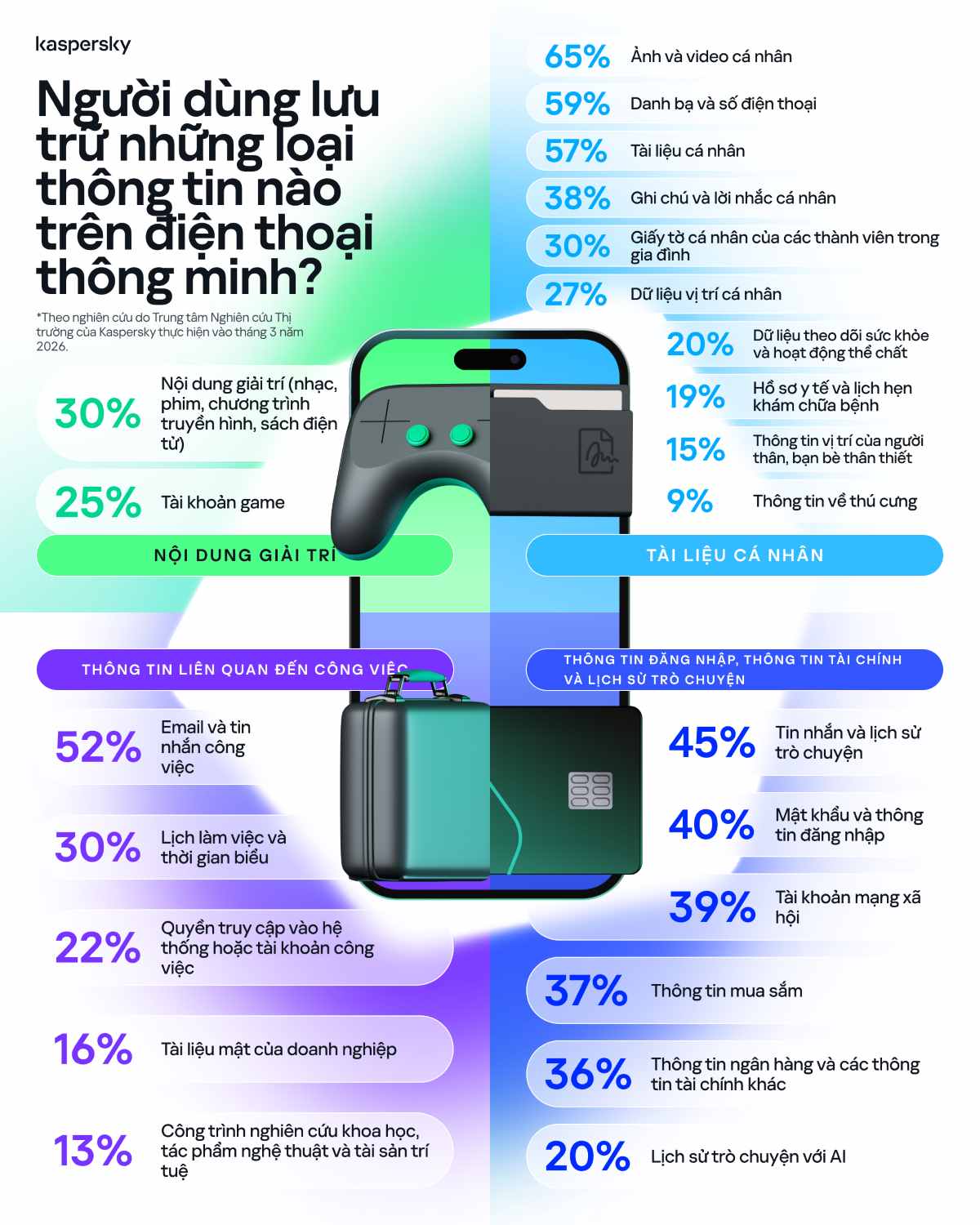
As smartphones become users' "digital companions" across the Asia-Pacific region, the amount of important data stored on this device has also increased significantly, most commonly personal photos and videos.
Nearly two-thirds of survey participants (65%) said they store their moments on their phones. Of which, 57% store contact information on their phones, (50%) store text messages and chat history.
Compared to the regional average, users in Vietnam place more trust in smartphones in protecting important personal information. Although personal photos and videos are still the most stored type of data (65%), users also tend to store contact information and phone numbers on smartphones more than the regional average (59%). The difference is even more obvious for personal papers such as ID cards, passports and insurance documents, when 57% of survey participants in Vietnam said they stored these data on their phones.
Anton Kivva, a cybersecurity expert at Kaspersky, said that with smartphones becoming a versatile assistant, present in almost every aspect of life, data protection is no less important than data storage.
Three principles to help protect data on mobile devices
To help users adapt safely to today's digital space, Kaspersky experts recommend three principles:
Do not store data on a single device: Smartphones should not be the only storage place for any type of data. For particularly sensitive data such as passwords, personal papers or financial information, users need to apply higher levels of protection and should store these data in a secured form.
Building a layer of protection against threats in the digital environment: Experts recommend users to use network security solutions with multi-layer protection capabilities, from scanning applications to detect risks immediately upon installation, to AI applications to block malicious links and scams in real time, thereby helping to prevent the risk of data loss or financial damage, along with many other layers of protection.
Prepare for a phone loss situation: If this happens, users can significantly reduce the risk by:
- Turn on device positioning. Both Android and iOS have built-in tools to help locate lost phones and remotely delete data when needed.
- Turn on automatic backup mode. Periodic backup will help you restore photos, videos, documents, contacts and other important data even if the device is lost or stolen.
- Set up screen lock as soon as the screen turns off. Locking the device immediately after it is no longer in use will help prevent thieves or cybercriminals from accessing the phone.
- Store your phone carefully. When in public places, do not leave your phone out of sight or in locations that are easy to steal such as on tables, back pockets or other easily accessible locations.