People from 60 years old use citizen identification cards to take buses
Hanoi City Traffic Management and Operation Center (Tramoc) is issuing and implementing the exchange of all paper monthly ticket cards into traffic ticket cards applied on all subsidized bus routes in Hanoi City.
Customers who register to use and extend (buy tickets) for traffic ticket cards will use non-cash payment methods. From July 1st, paper monthly tickets are no longer valid on subsidized bus routes.
According to Tramoc, all electronic ticket cards (virtual cards and physical cards) that have been issued and are in circulation before continue to be valid on the entire network of subsidized bus routes in the city.
In addition, free cards (unchip plastic cards) continue to be used until the end of July 31. From August 1st, free cards (unchip plastic cards) are no longer valid on subsidized bus routes.
The free subjects are the elderly (from 60 years old and over) and children under 6 years old using citizen identification cards or virtual cards (non-physical cards) when participating in subsidized public passenger transport.
Free subjects are people with meritorious services, people with disabilities, and people from poor households who use virtual cards (non-physical cards) or can register to issue physical cards with chips to use when participating in subsidized public passenger transport.
Traffic ticket card registration process According to Tramoc, each customer will own a unique identification account.
Customers can choose to use a virtual card or a physical card, but at one point they are only allowed to activate using 1 of the 2 types of cards.
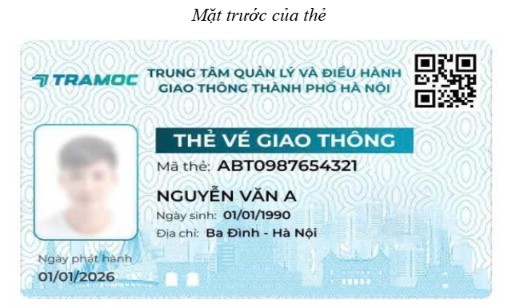
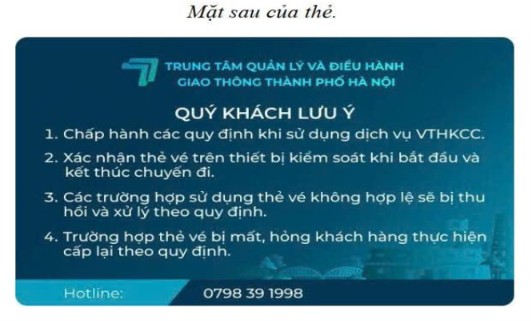
Register through the mobile application "Hanoi Traffic Ticket Card" - Applicable to customers who want to use virtual cards or physical cards with phone management features:
Step 1 - Download the application: Go to App Store (iOS) or CH Play (Android), find and download the application "HN Traffic Ticket Card".
Step 2 - Create an account: Enter phone number → Enter the OTP code sent to the machine → Set a password and log in.
Step 3 - Account verification: On the main screen, select "Verify" → Perform account verification with chip-based CCCD according to the instructions on the application. After successful account verification, the system automatically starts creating an Electronic Traffic Ticket Card Account on the application with the default object as Normal.
Step 4: Register for Priority/Free subjects (If available):
Go to Personal → Object Registration History → Select "Register for other objects".
Choose the appropriate target group (Students/Students, Industrial Park Workers, Poor Households, People with Disabilities...).
Fill in the information and attach a photo of the supporting documents (Student ID card, registration form certified by the school/IP Management Board...).
Click "Submit application" → The system will process and approve within 2-5 working days (excluding Saturdays, Sundays and holidays).
Register Physical Card via Website - Applicable to customers who do not use smartphones, only want to use a simple physical card, and do not need to manage on the application:
Step 1: Access website: https://vedientuonline.com.vn (Online e-ticket).
Step 2: At the "Register for physical transport card" screen, enter: ID card number, Phone number, Captcha code → Click "Continue".
Step 3: Upload photo of CCCD front, CCCD back and clear face portrait photo with CCCD (according to instructions) → Click "Continue".
Step 4: At the Add Registration Information screen, customers select the corresponding type of object:
general education subjects, not subject to priority, free;
Priority/Free: Provide information and upload photos of documents proving priority subjects (Student ID card, registration form certified by the school/IP Management Board...);
Then press "Continue".
Step 5: Enter the correct card recipient address and press "Continue".
Step 6: At the Buy Ticket screen, select tickets according to the mode of transportation and the desired ticket package, then press "Continue" to proceed with payment.
Step 7 - Payment: Customers choose the payment method, enter the Captcha code, then press "Payment" and perform payment according to the instructions, if customers choose to pay via QR Bank, use the Banking application (Mobile Banking) or e-wallet to scan the QR code to complete.
Step 8: The system reports successful registration. The physical chip card (NFC) will be processed and sent to the passenger's address after 3 - 5 working days (excluding Saturdays, Sundays and holidays).
Card renewal procedures directly at No. 1 Kim Ma or ticket sales points
Step 1: Customers bring an old paper monthly ticket card (including a valid monthly ticket stamp) and CCCD directly to the ticket sales point at No. 1 Kim Ma to be supported with the fastest exchange.
Step 2: Staff at the counter check the old paper card and compare documents proving priority subjects (if any).
Step 3: Passengers provide necessary information and submit a 3x4 portrait photo (or wear formal attire to take photos directly on the spot).
Step 4: The inspection staff issues the card directly to the customer.
Step 5: Customers receive the newly activated physical electronic monthly card with chip right at the counter (when completing procedures at No. 1 Kim Ma) or receive an appointment slip as prescribed.