According to Article 8, Circular 08/2026/TT-BKHCN, when the SIM is transferred to another device, the subscriber needs to re-verify the face (biometrics) within 2 hours. Biometric information must be compared to ensure compliance with the National Population Database, the citizen identification card (CCCD) database that has been stored by the network operator according to regulations.
Completing regulations to protect users
The addition of biometric authentication when changing equipment helps increase the layer of protection for subscribers, limiting the risk of thieves using stolen SIMs to appropriate OTP codes, access bank accounts, social networks or commit fraudulent acts.
According to Circular 08, biometric authentication is a mandatory requirement to ensure that the person transferring the SIM to the new device is the subscriber's own owner. In case the authentication is not completed, the network operator will temporarily suspend the service and handle the subscriber according to the prescribed schedule:
- After 02 hours: One-way lock (call-and-go lock, messages and data).
- After 30 days (from the date of being locked 1-way): 2-way lock (lock all functions of listening, calling, texting and data).
- After the next 05 days: The network operator will liquidate the contract and revoke the subscriber number permanently.
Therefore, users should complete authentication immediately after switching the SIM to a new device to ensure that communication is not interrupted.
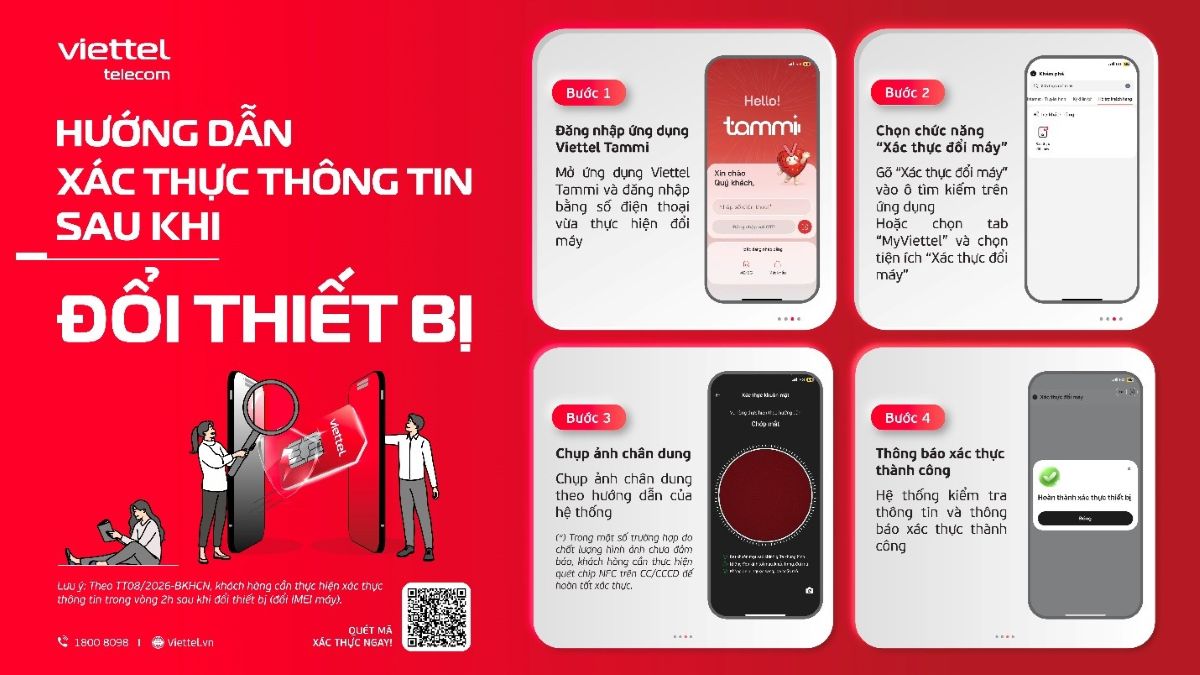
1. Quick authentication on Viettel Tammi
Customers can easily and proactively authenticate directly on the Viettel Tammi application without having to go to the transaction point. This authentication is completely free.
Four steps to verify information:
Step 1: Open the Viettel Tammi application and log in with the phone number you just changed.
Step 2: Select the "Change Verification" function (swipe "Change Verification" into the search box on the application or select the MyViettel tab and access the "Change Verification" utility).
Step 3: Take a portrait photo according to the system's instructions (in some cases, due to poor image quality, customers need to scan NFC on their citizen ID card to complete authentication).
Step 4: Wait for the system to check the information and notify "Successful verification".
2. Authentication at the transaction counter
For elderly users, people who do not use smartphones or have difficulty operating on the application, customers can go to Viettel's transaction points nationwide to be supported by staff to directly compare data.
Technical experts also noted that when self-verifying through the application, users need to perform in a sufficiently bright environment, remove sunglasses, masks and hats so that the face recognition camera system is accurate and fastest. In case of urgent support, Viettel network users can contact the hotline 1800 8098 (free) for guidance.