Tips to utilize useful features on Apple Pencil

BẠCH DƯƠNG |

Apple Pencil not only serves notes and sketches but also integrates many useful features to help iPad users work more efficiently.

Converting tools with just one touch

Apple Pencil 2nd generation and Apple Pencil Pro users can tap the flat edge of the pen twice to quickly switch between tools such as pens, markers or erasers. This feature can be customized in the settings to suit each person's usage habits.

Gently squeeze the Apple Pencil body to open the toolbar

Apple Pencil Pro is equipped with a pencil body squeezing operation. Just squeeze lightly, a floating toolpad will appear right on the screen, allowing quick access to pencils, colors, eraser tools, backstrokes or other shortcuts without moving to the toolbar.

Write anywhere on iPad

Thanks to the text-written feature (Scribble), users can use Apple Pencil to write directly into most inputs on the iPadOS operating system, from the search bar, Safari browser to the messaging application. The system will automatically convert handwriting into typed text almost in real time.

Quick notes everywhere

Apple Pencil supports the "Quick Notes" feature, which allows you to quickly open a floating notepad window just by swiping from the bottom right corner of the screen. Users can record ideas, phone numbers, addresses or insert websites they are viewing without opening the Notes app.

Immediate screenshot caption

Swiping from the bottom left corner of the screen with Apple Pencil will immediately activate screenshot and Markup mode. Users can write, draw, zone or add arrows directly to photos before sharing or saving.
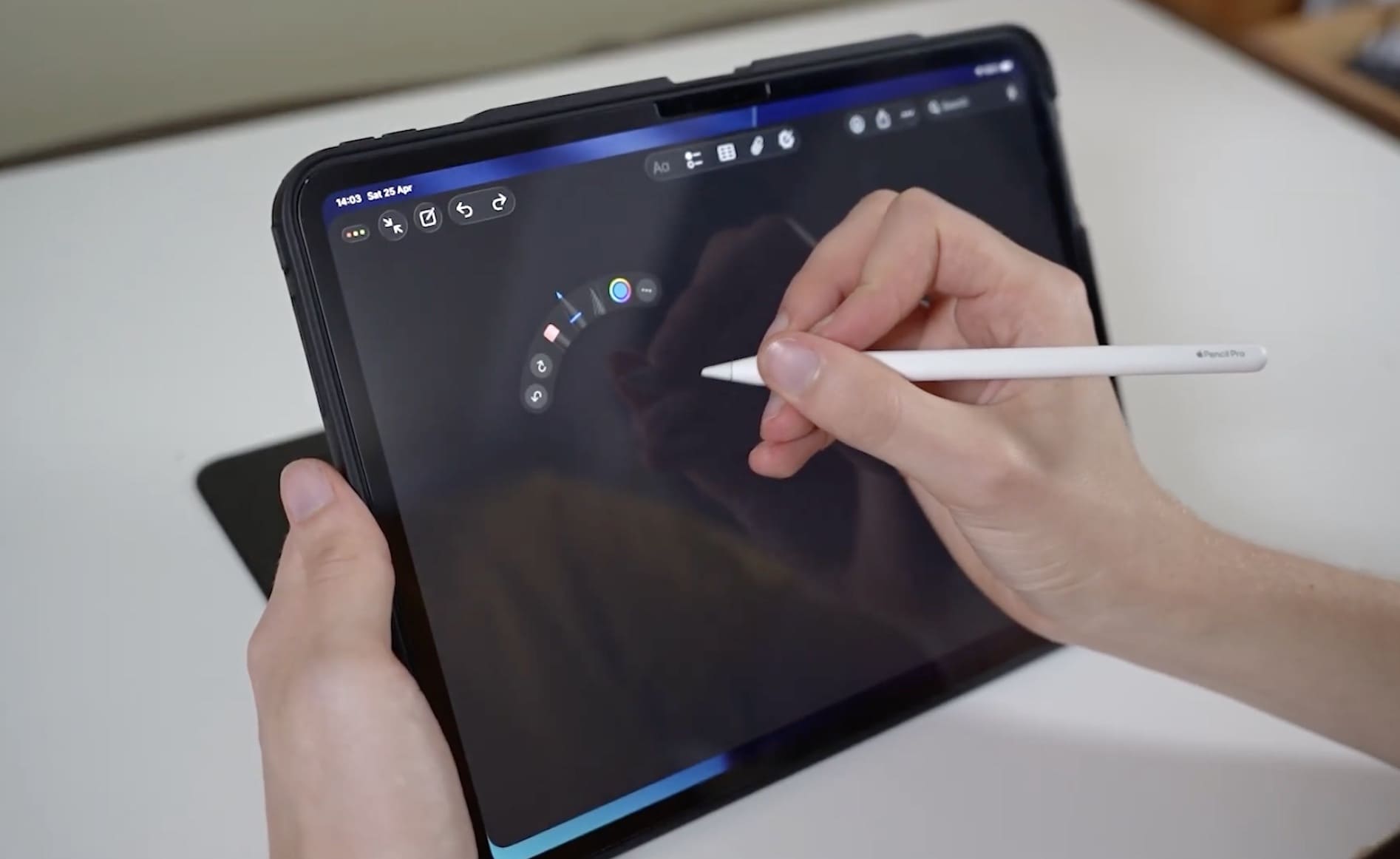
Apple Pencil Pro cho phép người dùng bóp nhẹ thân bút để mở nhanh bảng công cụ và chuyển đổi giữa các tùy chọn ngay trên iPad. Ảnh: Fix and Stuff
Apple Pencil Pro allows users to gently squeeze the pen body to quickly open the toolbar and switch between options right on the iPad. Photo: Fix and Stuff

Use Apple Pencil to draw and control your Mac

Through the Sidecar feature, the iPad can operate as a secondary screen of the Mac. At that time, the Apple Pencil not only acts as a control mouse but also becomes a tool for drawing, editing photos, marking documents or performing accurate operations in creative applications on macOS.

Notes right from the lock screen

One of the highly appreciated features is the ability to open notes directly from the lock screen. Just touch the Apple Pencil on the locked iPad screen, users can immediately start taking notes without unlocking the device.

Automatically beautify handwriting

Apple has added the Auto-refine Handwriting feature to help improve the clarity of handwriting. The system will automatically edit scribbled lines into a more easy-to-read version but still retain the user's own writing style.

Turn strokes into accurate blocks

When drawing basic shapes such as squares, circles, triangles or arrows, users only need to hold the pen tip for another second after completing the stroke. The iPad will automatically edit the lines into a more complete and balanced geometric shape.

Adjust strokes with angle and pressure

Apple Pencil Pro also supports recognizing the pressure and rotation angle of the pen. Users can rotate the pen body to change the stroke thickness or simulate the feeling of using a professional pen and brush, bringing a more natural creative experience.

Preview of strokes using the Hover feature

Both Apple Pencil Pro and Apple Pencil USB-C support the Hover feature. When the pen tip is moved a few millimeters away from the screen, the iPad will display the position, size or shape of the stroke before the user actually touches the screen. This feature is especially useful when sketching or editing details.

BẠCH DƯƠNG
RELATED NEWS

Leaked information that Apple has started developing iOS 28 and macOS 28

|

The first information about iOS 28 and macOS 28 has appeared as Apple is said to be quietly developing the next generation of software.

Apple overhauls Siri and ultimate weapon directly threatens ChatGPT

|

Apple is preparing a comprehensive overhaul of Siri on iOS 27, turning this virtual assistant into a supreme weapon that directly threatens ChatGPT's position.

5 tips to make the most of Apple Pencil when taking notes on iPad

|

The Apple Pencil is not only used for drawing but is also a powerful note-taking tool on the iPad. The following tips will help you exploit the maximum efficiency when writing digital handwriting.

Proposing 2 more days off on National Day

|

Union members, workers and trade union organizations proposed considering and adding 2 more holidays on National Day.

The mark of a female Trade Union leader in a business in Gia Lai

|

At the grassroots trade union, Huynh Thi Thanh Hoa - Chairwoman of the grassroots trade union of Gia Lai Education Development Investment Printing Joint Stock Company (Thong Nhat Ward Trade Union) made efforts to build many clauses that benefit workers, difficult circumstances, and sick people who are wholeheartedly helped and shared by the Trade Union.

Creating motivation for workers to emulate creative labor, improving labor productivity

|

The Trade Union of Vietnam National Energy Industry Group (Petrovietnam Trade Union) always encourages, cares for, protects and encourages; creates motivation for workers to preserve the tradition of "people seeking fire", nurture aspirations, constantly emulate, study, train, and improve their qualifications.

Hai Phong City Trade Union: From equipping free wifi to improving the spiritual life of workers

|

Recently, 90 worker dormitories in Hai Phong City were equipped with free wireless Internet access systems, bringing joy to thousands of migrant workers.

More than 13,500 Vinh Long workers join the Trade Union organization

|

In the first 6 months of 2026, Vinh Long province's trade union levels developed more than 13,500 new union members, reaching over 51% of the annual plan, affirming the attraction from practical benefits for workers.

Leaked information that Apple has started developing iOS 28 and macOS 28

BẠCH DƯƠNG |

The first information about iOS 28 and macOS 28 has appeared as Apple is said to be quietly developing the next generation of software.

Apple overhauls Siri and ultimate weapon directly threatens ChatGPT

Cát Tiên |

Apple is preparing a comprehensive overhaul of Siri on iOS 27, turning this virtual assistant into a supreme weapon that directly threatens ChatGPT's position.

5 tips to make the most of Apple Pencil when taking notes on iPad

Cát Tiên (T/H) |

The Apple Pencil is not only used for drawing but is also a powerful note-taking tool on the iPad. The following tips will help you exploit the maximum efficiency when writing digital handwriting.