According to the plan, from July 2nd to 5:00 PM on July 14th, candidates will begin to register and adjust their admission aspirations on the general admission system of the Ministry of Education and Training.
All candidates, including independent candidates and direct admission candidates, are required to register for online admission on the common admission support system of the Ministry of Education and Training.
The new point of this year's university admission regulations is that candidates are only allowed to register a maximum of 15 admission aspirations on the General System of the Ministry of Education and Training instead of being unlimited as before. Those who want to enter the Pedagogy major need to place their aspirations in positions 1 to 5.
University admission application process for 2026
Candidates register their aspirations in the following steps:
Step 1: Log in to the Ministry of Education and Training's enrollment system
Candidates access the Ministry of Education and Training's system: https://thisinh. thitotnghiepthpt. edu. vn. Then log in by entering complete information including: ID card number or personal identification code, issued password, confirmation code to access personal account, select Log in.
Step 2: Check personal information
After successfully logging in, candidates should carefully check personal information such as: Full name, date of birth, ID card number, priority area, priority subjects and related evidence... If inaccurate information is detected, they need to contact the application receiving point to be supported with adjustments before registering their aspirations.
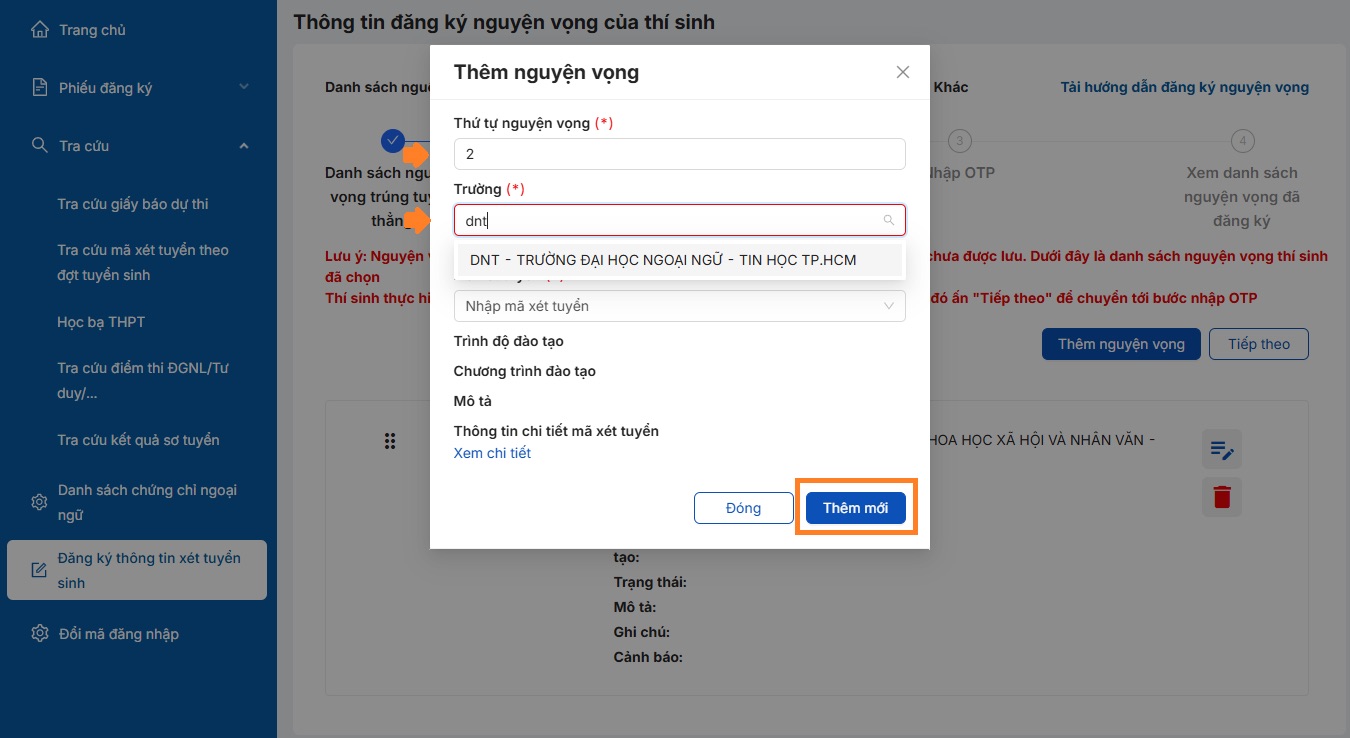
Step 3: Register university admission aspirations
In the "Register admission information" section in the left column, candidates eligible for direct admission should choose direct admission aspirations according to the system's instructions.
For candidates applying for admission by other methods, candidates select Add aspirations and enter complete information: aspiration order, school, admission code. After completion, select "Add new" to save aspirations.
Each aspiration corresponds to a specific major at a university. Therefore, candidates need to carefully check the school code and major code before confirming.
Step 4: Arrange aspirations in order
After completing registration, candidates will arrange their aspirations in priority order from highest to lowest. The ministry's common admission system will consider from aspirations with the highest priority order to lower.
If candidates meet the conditions for admission in nguyện vọng 1, the system will stop considering the nguyện vọng below. If they do not meet the conditions in nguyện vọng 1, the system will continue to consider nguyện vọng 2 and subsequent nguyện vọng.
The system allows candidates to edit, delete or rearrange the order of aspirations before confirming.
Step 5: Confirm nguyện vọng registration
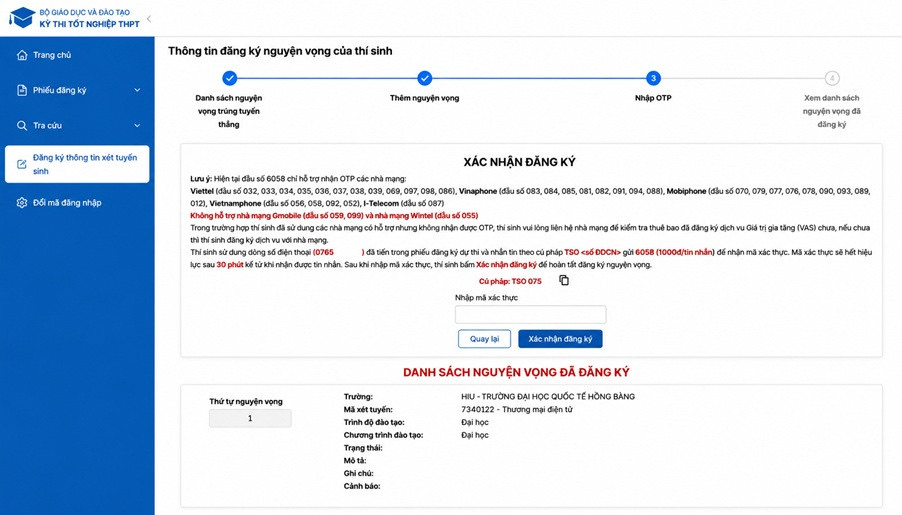
After checking all information, candidates verify registration using OTP code.
Candidates use the phone number registered on the system, compose a text message according to the prescribed syntax to receive the OTP code sent to their phone, enter the OTP code into the system. Then, candidates select Confirm registration.
After successful confirmation, all nguyện vọng registration information will be recorded by the system.
Candidates need to check the entire list of aspirations and save prints or screenshots for comparison when necessary.
Step 6: Pay online admission fees
After the end of the aspiration registration period, candidates need to pay the admission fee according to the guidance of the Ministry of Education and Training.
Candidates choose the System Payment function, check the number of registered aspirations, confirm payment information, choose a suitable payment method, and complete the transaction.
The aspiration is only recorded as valid by the system when the candidate completes the payment of online admission fees according to the instructions.